
Threat Awareness Training can provide comprehensive training to your employees about the various types of threats, including internal threats, and how to identify and avoid them. This can help prevent data exfiltration attempts from within the company.
Implementing Robust Security Measures: Tech At You can help your business implement robust security measures such as firewalls, intrusion detection systems, and encryption to protect your data from being accessed or stolen.
Regular Auditing of Logs: Tech At You can perform regular audits of your system logs to identify any unusual or suspicious activity. This can help detect any potential data exfiltration attempts early, allowing you to take action before any significant damage is done.
Incident Response Planning: Tech At You can help your business develop an effective incident response plan. This plan can outline the steps to be taken in the event of a security breach, helping to minimize the impact and ensure a swift recovery.
Secure Data Storage: Tech At You can provide secure data storage solutions, ensuring that your sensitive business data is stored in a manner that is safe from potential threats.
Regular System Updates and Patches: Tech At You can ensure that your systems are regularly updated and patched, helping to protect against any vulnerabilities that could be exploited by malicious actors.
Implementing Access Controls: Tech At You can help your business implement strict access controls, ensuring that only authorized individuals have access to sensitive data. This can help prevent data exfiltration by limiting who can access your data.
Regular Security Assessments: Tech At You can perform regular security assessments to identify any potential weaknesses in your security measures and recommend improvements.
Data Loss Prevention (DLP) Tools: Tech At You can implement DLP tools that can detect potential data breaches/transfers and prevent them by monitoring, detecting and blocking sensitive data while in-use, in-motion, and at-rest.
Employee Monitoring: Tech At You can provide solutions for monitoring employee activity to prevent insider threats. This includes monitoring for unusual data access or transfer activities.
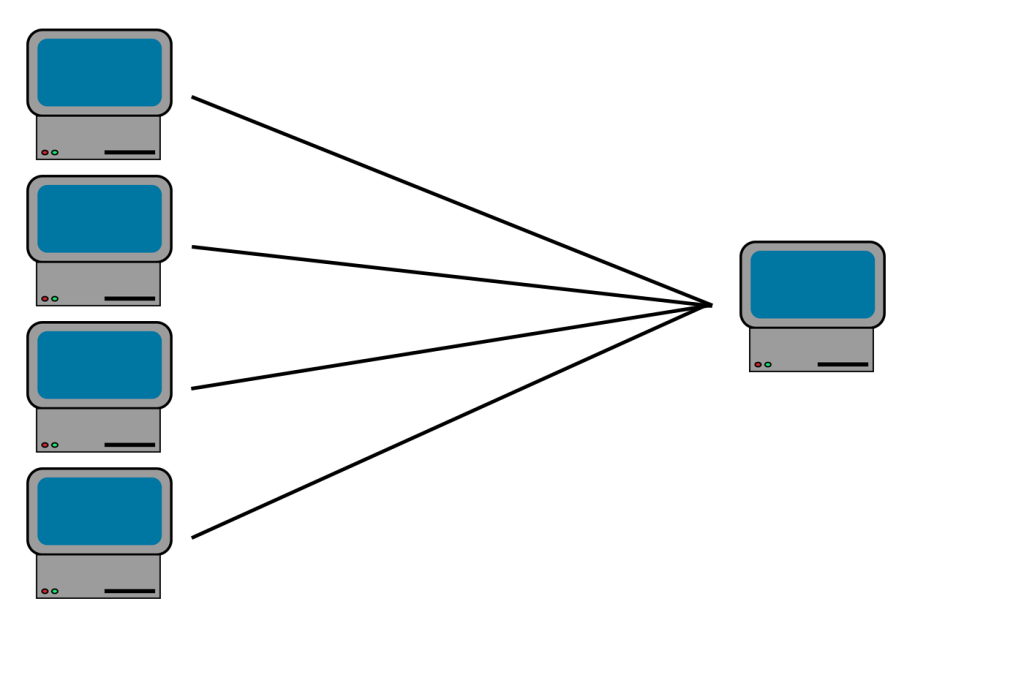
A UDP flood is a type of denial-of-service attack in which a large number of User Datagram Protocol (UDP) packets are sent to a targeted server with the aim of overwhelming that device’s ability to process and respond. The firewall protecting the targeted server can also become exhausted as a result of UDP flooding, resulting in a denial-of-service to legitimate traffic.
How does a UDP flood attack work?
A UDP flood leverages the procedural response of a server to incoming UDP packets at its ports. Ordinarily, upon receiving a UDP packet, the server undergoes a two-step verification process:
It first identifies whether there are any active programs poised to accept requests on the targeted port.
Should it find the port devoid of listening programs, the server issues an ICMP (ping) packet back to the originator, signaling the unreachability of the destination.
This process can be analogized to a hotel receptionist managing incoming calls. Upon receiving a call, the receptionist checks whether the requested guest is present and accepting calls. Discovering the guest’s unavailability, the receptionist must inform the caller of their inability to connect the call. The scenario becomes overwhelming when multiple calls flood in simultaneously, each requiring the receptionist to verify availability and respond accordingly—this is the crux of a UDP flood attack, aimed at inundating the server with futile packet checks and responses.
Whenever the server receives a new UDP packet, it processes the request, using server resources along the way. Each UDP packet sent includes the sender’s IP address. In a DDoS attack of this kind, attackers typically hide their actual IP address by falsifying (or “spoofing”) the source IP address in the UDP packets. This tactic prevents the attacker’s true location from being revealed and avoids the possibility of their location being overwhelmed by response packets from the server they’re targeting.
As the server expends resources to verify and respond to each UDP packet, its resources can be quickly depleted if a massive volume of UDP packets is sent its way. This can lead to a denial-of-service for legitimate traffic, as the server becomes overwhelmed.
Threat Awareness Training can provide comprehensive training to your employees about the various types of threats, including internal threats, and how to identify and avoid them. This can help prevent data exfiltration attempts from within the company.
Implementing Robust Security Measures: Tech At You can help your business implement robust security measures such as firewalls, intrusion detection systems, and encryption to protect your data from being accessed or stolen.
Regular Auditing of Logs: Tech At You can perform regular audits of your system logs to identify any unusual or suspicious activity. This can help detect any potential data exfiltration attempts early, allowing you to take action before any significant damage is done.
Incident Response Planning: Tech At You can help your business develop an effective incident response plan. This plan can outline the steps to be taken in the event of a security breach, helping to minimize the impact and ensure a swift recovery.
Secure Data Storage: Tech At You can provide secure data storage solutions, ensuring that your sensitive business data is stored in a manner that is safe from potential threats.
Regular System Updates and Patches: Tech At You can ensure that your systems are regularly updated and patched, helping to protect against any vulnerabilities that could be exploited by malicious actors.
Implementing Access Controls: Tech At You can help your business implement strict access controls, ensuring that only authorized individuals have access to sensitive data. This can help prevent data exfiltration by limiting who can access your data.
Regular Security Assessments: Tech At You can perform regular security assessments to identify any potential weaknesses in your security measures and recommend improvements.
Data Loss Prevention (DLP) Tools: Tech At You can implement DLP tools that can detect potential data breaches/transfers and prevent them by monitoring, detecting and blocking sensitive data while in-use, in-motion, and at-rest.
Employee Monitoring: Tech At You can provide solutions for monitoring employee activity to prevent insider threats. This includes monitoring for unusual data access or transfer activities.

In the ever-evolving landscape of cyber threats, ransomware attacks pose a significant risk to businesses worldwide. Tech At You, LLC a renowned cyber attack consultant, has distinguished itself as a leader in rapid and effective response to ransomware attacks.
Rapid Ransomware Response: Tech At You’s first responder service is specifically designed to address ransomware attacks. They offer immediate ransomware remediation and a comprehensive incident response process, ensuring minimal downtime for your business.
Negotiation Expertise: If a backup fails during a ransomware attack, Tech At You steps in to negotiate the ransom with the hackers. Their team is skilled in bitcoin ransom payment negotiation, a critical aspect of dealing with modern-day cybercriminals.
Proven Success Rate: Tech At You’s approach to ransomware response has been tested and proven, with a remarkable 99% success rate in previous ransomware cases. This track record demonstrates their ability to get businesses back online quickly and efficiently.
Customer-Centric Approach: Tech At You’s ransomware incident breach response team is always ready to assist. Their commitment to excellent customer service ensures that your business receives the support it needs during a crisis.
In conclusion, Tech At You LLC’s specialized focus on ransomware response, combined with their negotiation expertise, proven success rate, and customer-centric approach, makes them an industry leader in combating ransomware attacks. With Tech At You, businesses can rest assured that they have a reliable partner to navigate the complexities of ransomware threats.